Selasa, 10 April 2012

3 Tips to Make Blogger Blog SEO Friendly


Blogger (Blogspot is the ultimate way of blogging for beginners as well as experts). Blogger offers first class server faster than any shared hosting server. Besides a blogger blog is always being safe from hackers and you do not need to setup security system such like in self hosted WordPress. But the only need is to make your blogger blog SEO friendly.

Change default Post title
In-Built templates of Blogger are attractive and professional but the default article title format is not SEO friendly and it comes after blog title for example if you have written following title for your post;
“SECRETS OF SUCCESSFUL BLOGGING” then it looks like this;
“BLOG TITLE- SECRETS OF SUCCESSFUL BLOGGING” but we need to change it to
“SECRETS OF SUCCESSFUL BLOGGING-BLOG TITLE”

• Go to your blogger “Edit HTML” option and find the following live of code
<title><data:blog.pageTitle/></title>

• Replace the above code with the following code given below;
<b:if cond=’data:blog.pageType == &quot;index&quot;’>
<title><data:blog.title/></title>
<b:else/>
<title><data:blog.pageName/></title>
</b:if>

Adding keywords meta tag
• Add the following tag in template head section
<meta content='KEYWORDS HERE' name='keywords'/>
• Here you can add meta keywords for your blog.

Adding meta description to your blog
You can add meta description using blogger dashboard settings where you will find the description field to fill the meta description.

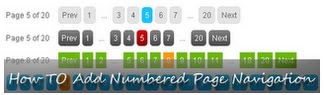
How To Add Numbered Page Navigation For Bloggers


1. Login to your blogger dashboard--> layout- -> Edit HTML
2. Scroll down to where you see ]]></b:skin> tag
3. Copy below code and paste it just before the ]]></b:skin> tag.

.showpageArea a {
text-decoration:underline;
}
.showpageNum a {
border:1px solid #CCCCCC;
margin:0 3px;
padding:3px 7px;
text-decoration:none;
}
.showpageNum a:hover {
background-color:#CCCCCC;
border:1px solid #CCCCCC;
}
.showpagePoint {
-moz-background-clip:border;
-moz-background-inline-policy:continuous;
-moz-background-origin:padding;
background:#CCCCCC none repeat scroll 0 0;
border:1px solid #CCCCCC;
color:#333333;
margin:0 3px;
padding:3px 7px;
text-decoration:none;
}
.showpageOf {
margin:0 3px 0 0;
padding:3px 7px;
text-decoration:none;
}
.showpage a {
border:1px solid #CCCCCC;
padding:3px 7px;
text-decoration:none;
}
.showpage a:hover {
text-decoration:none;
}
.showpageNum a:link, .showpage a:link {
color:#333333;
text-decoration:none;
}


4. Now save your template.
5. Go to Layout-->Page Elements and click on "Add a gadget".Select "html/java script" and add the code given below and click save.Now drag your new gadget under "Blog Posts" Section.


<script type='text/javascript'>
var home_page_url = location.href;
var pageCount=1;
var displayPageNum=3;
var upPageWord ='Previous';
var downPageWord ='Next';
function showpageCount(json) {
var thisUrl = home_page_url;
var htmlMap = new Array();
var thisNum = 1;
var postNum=1;
var itemCount = 0;
var fFlag = 0;
var eFlag = 0;
var html= '';
var upPageHtml ='';
var downPageHtml ='';
for(var i=0, post; post = json.feed.entry[i]; i++) {
var timestamp1 = post.published.$t.substring(0,19)+post.published.$t.substring(23,29);
timestamp = encodeURIComponent(timestamp1);
var title = post.title.$t;
if(title!=''){
if(itemCount==0 || (itemCount % pageCount ==(pageCount-1))){
if(thisUrl.indexOf(timestamp)!=-1 ){
thisNum = postNum;
}

if(title!='') postNum++;
htmlMap[htmlMap.length] = '/search?updated-max='+timestamp+'&max-results='+pageCount;
}
}
itemCount++;
}
for(var p =0;p< htmlMap.length;p++){
if(p>=(thisNum-displayPageNum-1) && p<(thisNum+displayPageNum)){
if(fFlag ==0 && p == thisNum-2){
if(thisNum==2){
upPageHtml = '<span class="showpage"><a href="/">'+ upPageWord +'</a></span>';
}else{
upPageHtml = '<span class="showpage"><a href="'+htmlMap[p]+'">'+ upPageWord +'</a></span>';
}

fFlag++;
}
if(p==(thisNum-1)){
html += '<span class="showpagePoint">'+thisNum+'</span>';
}else{
if(p==0){
html += '<span class="showpageNum"><a href="/">1</a></span>';

}else{
html += '<span class="showpageNum"><a href="'+htmlMap[p]+'">'+ (p+1) +'</a></span>';
}
}
if(eFlag ==0 && p == thisNum){
downPageHtml = '<span class="showpage"> <a href="'+htmlMap[p]+'">'+ downPageWord +'</a></span>';
eFlag++;
}
}
}

if(thisNum>1){
html = ''+upPageHtml+' '+html +' ';
}

html = '<div class="showpageArea"><span class="showpageOf"> Pages ('+(postNum-1)+')</span>'+html;

if(thisNum<(postNum-1)){
html += downPageHtml;
}

if(postNum==1) postNum++;
html += '</div>';

var pageArea = document.getElementsByName("pageArea");
var blogPager = document.getElementById("blog-pager");

if(postNum <= 2){
html ='';
}
for(var p =0;p< pageArea.length;p++){
pageArea[p].innerHTML = html;
}

if(pageArea&&pageArea.length>0){
html ='';
}
if(blogPager){
blogPager.innerHTML = html;
}
}
function showpageCount2(json) {
var thisUrl = home_page_url;
var htmlMap = new Array();
var isLablePage = thisUrl.indexOf("/search/label/")!=-1;
var thisLable = isLablePage ? thisUrl.substr(thisUrl.indexOf("/search/label/")+14,thisUrl.length) : "";
thisLable = thisLable.indexOf("?")!=-1 ? thisLable.substr(0,thisLable.indexOf("?")) : thisLable;
var thisNum = 1;
var postNum=1;
var itemCount = 0;
var fFlag = 0;
var eFlag = 0;
var html= '';
var upPageHtml ='';
var downPageHtml ='';

var labelHtml = '<span class="showpageNum"><a href="/search/label/'+thisLable+'?&max-results='+pageCount+'">';
var thisUrl = home_page_url;
for(var i=0, post; post = json.feed.entry[i]; i++) {
var timestamp1 = post.published.$t.substring(0,19)+post.published.$t.substring(23,29);
timestamp = encodeURIComponent(timestamp1);
var title = post.title.$t;
if(title!=''){
if(itemCount==0 || (itemCount % pageCount ==(pageCount-1))){
if(thisUrl.indexOf(timestamp)!=-1 ){
thisNum = postNum;
}

if(title!='') postNum++;
htmlMap[htmlMap.length] = '/search/label/'+thisLable+'?updated-max='+timestamp+'&max-results='+pageCount;

}
}
itemCount++;
}
for(var p =0;p< htmlMap.length;p++){
if(p>=(thisNum-displayPageNum-1) && p<(thisNum+displayPageNum)){
if(fFlag ==0 && p == thisNum-2){
if(thisNum==2){
upPageHtml = labelHtml + upPageWord +'</a></span>';
}else{
upPageHtml = '<span class="showpage"><a href="'+htmlMap[p]+'">'+ upPageWord +'</a></span>';
}

fFlag++;
}

if(p==(thisNum-1)){
html += '<span class="showpagePoint">'+thisNum+'</span>';
}else{
if(p==0){
html = labelHtml+'1</a></span>';
}else{
html += '<span class="showpageNum"><a href="'+htmlMap[p]+'">'+ (p+1) +'</a></span>';
}
}
if(eFlag ==0 && p == thisNum){
downPageHtml = '<span class="showpage"> <a href="'+htmlMap[p]+'">'+ downPageWord +'</a></span>';
eFlag++;
}
}
}
if(thisNum>1){
if(!isLablePage){
html = ''+upPageHtml+' '+html +' ';
}else{
html = ''+upPageHtml+' '+html +' ';
}
}

html = '<div class="showpageArea"><span class="showpageOf"> Pages ('+(postNum-1)+')</span>'+html;

if(thisNum<(postNum-1)){
html += downPageHtml;
}
if(postNum==1) postNum++;
html += '</div>';
var pageArea = document.getElementsByName("pageArea");
var blogPager = document.getElementById("blog-pager");
if(postNum <= 2){
html ='';
}

for(var p =0;p< pageArea.length;p++){
pageArea[p].innerHTML = html;
}

if(pageArea&&pageArea.length>0){
html ='';
}
if(blogPager){
blogPager.innerHTML = html;
}
}
</script>
<script type='text/javascript'>
var thisUrl = home_page_url;
if (thisUrl.indexOf("/search/label/")!=-1){
if (thisUrl.indexOf("?updated-max")!=-1){
var lblname1 = thisUrl.substring(thisUrl.indexOf("/search/label/")+14,thisUrl.indexOf("?updated-max"));
}else{
var lblname1 = thisUrl.substring(thisUrl.indexOf("/search/label/")+14,thisUrl.indexOf("?&max"));
}
}
var home_page = "/";
if (thisUrl.indexOf("?q=")==-1){
if (thisUrl.indexOf("/search/label/")==-1){
document.write('<script src="'+home_page+'feeds/posts/summary?alt=json-in-script&callback=showpageCount&max-results=99999" ><\/script>')
}else{document.write('<script src="'+home_page+'feeds/posts/full/-/'+lblname1+'?alt=json-in-script&callback=showpageCount2&max-results=99999" ><\/script>')
}
}
</script>

Add The V3 Complete Sexy Bookmarks Gadget To Your Blog

Step 1.In Your Blogger Dashboard Click Design > Edit Html > Tick The Expand Widget Templates Box


Step 2. Find the following piece of code in your blogs Html : (Click Ctrl and F for a search bar to help find the code - More Info)
</head>

Step 3. Copy and Paste the following code directly Above / Before </head>

-If you previously added jQuery to your blog you can remove the line in yellow.
<script src='http://ajax.googleapis.com/ajax/libs/jquery/1.5.0/jquery.min.js'
type='text/javascript' />
<link href='http://bloggerblogwidgets.googlecode.com/svn/trunk/auto-hide-social-bookmarking-way2blogging.css'
rel='stylesheet' type='text/css' />
<script type="text/javascript">
jQuery(document).ready(function() {
jQuery('.sexy-bookmarks a.external').attr("target", "_blank");
var sexyBaseHeight = jQuery('.sexy-bookmarks').height();
var sexyFullHeight = jQuery('.sexy-bookmarks ul.socials').height();
if (sexyFullHeight > sexyBaseHeight) {
jQuery('.sexy-bookmarks-expand').hover(

function() {
jQuery(this).animate({
height: sexyFullHeight + 15 + 'px'
}, {
duration: 800,
queue: false
});
}, function() {
jQuery(this).animate({
height: sexyBaseHeight + 'px'
}, {
duration: 800,
queue: false
});
});
}
if (jQuery('.sexy-bookmarks-center')) {
var sexyFullWidth = jQuery('.sexy-bookmarks').width();
var sexyBookmarkWidth = jQuery('.sexy-bookmarks:first ul.socials li').width();
var sexyBookmarkCount = jQuery('.sexy-bookmarks:first ul.socials li').length;
var numPerRow = Math.floor(sexyFullWidth / sexyBookmarkWidth);
var sexyRowWidth = Math.min(numPerRow, sexyBookmarkCount) * sexyBookmarkWidth;
var sexyLeftMargin = (sexyFullWidth - sexyRowWidth) / 2;
jQuery('.sexy-bookmarks-center').css('margin-left', sexyLeftMargin + 'px');
}
});
</script>

Step 4. Find the following piece of code in your blogs Html : (Click Ctrl and F for a search bar to help find the code - More Info)
<div class='post-footer'>

- If you cant find this use <data:post.body/>
instead.

Step 5. Copy and Paste the following code Directly Below / Under <div class='post-footer'>
<!--start bookmarks sexy-->
<b:if cond='data:blog.pageType == &quot;item&quot;'>
<div id='post-width-w2b' style='width:550px;'>
<div class='sexy-bookmarks-bg-sexy sexy-bookmarks sexy-bookmarks-expand sexy-bookmarks-center '>
<ul class='socials'>
<li class='sexy-twitter'>
<a class='external' expr:href='&quot;http://twitter.com/home?status=&quot; + data:post.title + &quot; -- &quot; + data:post.url ' rel='nofollow' title='Tweet This!'/>
</li>
<li class='sexy-facebook'>
<a class='external' expr:href='&quot;http://www.facebook.com/share.php?v=4&amp;src=bm&amp;u=&quot; + data:post.url + &quot;&amp;t=&quot; + data:post.title ' onclick='window.open(this.href,&apos;sharer&apos;,&apos;toolbar=0,status=0,width=626,height=436&apos;); return false;' rel='nofollow' title='Share this on Facebook'/>
</li>
<li class='sexy-linkedin'>
<a class='external' expr:href='&quot;http://www.linkedin.com/shareArticle?mini=true&amp;url=&quot; + data:post.url + &quot;&amp;title=&quot; + data:post.title + &quot;&amp;summary=&amp;source=&quot;' rel='nofollow' title='Share this on LinkedIn'/>
</li>
<li class='sexy-stumbleupon'>
<a class='external' expr:href='&quot;http://www.stumbleupon.com/submit?url=&quot; + data:post.url + &quot;&amp;title=&quot; + data:post.title ' rel='nofollow' title='Stumble upon something good? Share it on StumbleUpon'/>
</li>
<li class='sexy-delicious'>
<a class='external' expr:href='&quot;http://delicious.com/post?url=&quot; + data:post.url + &quot;&amp;title=&quot; + data:post.title ' rel='nofollow' title='Share this on del.icio.us'/>
</li>
<li class='sexy-digg'>
<a class='external' expr:href='&quot;http://digg.com/submit?phase=2&amp;url=&quot; + data:post.url + &quot;&amp;title=&quot; + data:post.title ' rel='nofollow' title='Digg this!'/>
</li>
<li class='sexy-googlebuzz'>
<a class='external' expr:href='&quot;http://www.google.com/buzz/post?url=&quot; + data:post.url + &quot;&amp;imageurl=&quot;' rel='nofollow' title='Post on Google Buzz'/>
</li>
<li class='sexy-blogger'>
<a class='external' expr:href='&quot;http://www.blogger.com/blog_this.pyra?t&amp;u=&quot; + data:post.url + &quot;&amp;n=&quot; + data:post.title + &quot;&amp;pli=1&quot;' rel='nofollow' title='Blog this on Blogger'/>
</li>
<li class='sexy-yahoomail'>
<a class='external' expr:href='&quot;http://compose.mail.yahoo.com/?Subject= &quot; + data:post.title + &quot;&amp;body=Link:&quot;+ data:post.url' rel='nofollow' title='Email this via Yahoo! Mail'/>
</li>
<li class='sexy-gmail'>
<a class='external' expr:href='&quot;https://mail.google.com/mail/?ui=2&amp;view=cm&amp;fs=1&amp;tf=1&amp;su=&quot; + data:post.title + &quot;&amp;body=Link:&quot; + data:post.url' rel='nofollow' title='Email this via Gmail'/>
</li>
<li class='sexy-googlebookmarks'>
<a class='external' expr:href='&quot;http://www.google.com/bookmarks/mark?op=add&amp;bkmk=&quot; + data:post.url + &quot;&amp;title=&quot; + data:post.title ' rel='nofollow' title='Add this to Google Bookmarks'/>
</li>
<li class='sexy-googlereader'>
<a class='external' expr:href='&quot;http://www.google.com/reader/link?url=&quot; + data:post.url + &quot;&amp;title=&quot; + data:post.title + &quot;&amp;srcUrl=&quot; + data:post.url + &quot;&amp;srcTitle=&quot; + data:post.title + &quot;&amp;snippet=&quot;' rel='nofollow' title='Add this to Google Reader'/>
</li>
<li class='sexy-comfeed'>
<a class='external' expr:href='data:blog.homepageUrl + &quot;feeds/&quot; + data:post.id + &quot;/comments/default?alt=rss&quot;' rel='nofollow' title='Subscribe to the comments for this post?'/>
</li>
<li class='sexy-orkut'>
<a class='external' expr:href='&quot;http://promote.orkut.com/preview?nt=orkut.com&amp;tt=&quot; + data:post.title + &quot;&amp;du=&quot; + data:post.url + &quot;&amp;cn=&quot;' rel='nofollow' title='Promote this on Orkut'/>
</li>
<li class='sexy-designbump'>
<a class='external' expr:href='&quot;http://designbump.com/submit?url=&quot; + data:post.url + &quot;&amp;title=&quot; + data:post.title + &quot;&amp;body=&quot;' rel='nofollow' title='Bump this on DesignBump'/>
</li>
<li class='sexy-reddit'>
<a class='external' expr:href='&quot;http://reddit.com/submit?url=&quot; + data:post.url + &quot;&amp;title=&quot; + data:post.title ' rel='nofollow' title='Share this on Reddit'/>
</li>
<li class='sexy-designfloat'>
<a class='external' expr:href='&quot;http://www.designfloat.com/submit.php?url=&quot; + data:post.url + &quot;&amp;title=&quot; + data:post.title ' rel='nofollow' title='Submit this to DesignFloat'/>
</li>
<li class='sexy-friendfeed'>
<a class='external' expr:href='&quot;http://www.friendfeed.com/share?title=&quot; + data:post.title + &quot;&amp;link=&quot; + data:post.url ' rel='nofollow' title='Share this on FriendFeed'/>
</li>
<li class='sexy-dzone'>
<a class='external' expr:href='&quot;http://www.dzone.com/links/add.html?url=&quot; + data:post.url + &quot;&amp;title=&quot; + data:post.title + &quot;&amp;description=&quot;' rel='nofollow' title='Add this to DZone'/>
</li>
<li class='sexy-webblend'>
<a class='external' expr:href='&quot;http://thewebblend.com/submit?url=&quot; + data:post.url + &quot;&amp;title=&quot; + data:post.title + &quot;&amp;body=&quot;' rel='nofollow' title='Blend this!'/>
</li>
<li class='sexy-propeller'>
<a class='external' expr:href='&quot;http://www.propeller.com/submit/?url=&quot; + data:post.url ' rel='nofollow' title='Submit this story to Propeller'/>
</li>
<li class='sexy-tumblr'>
<a class='external' expr:href='&quot;http://www.tumblr.com/share?v=3&amp;u=&quot; + data:post.url + &quot;&amp;t=&quot; + data:post.title ' rel='nofollow' title='Share this on Tumblr'/>
</li>
<li class='sexy-squidoo'>
<a class='external' expr:href='&quot;http://www.squidoo.com/lensmaster/bookmark?&quot; + data:post.url ' rel='nofollow' title='Add to a lense on Squidoo'/>
</li>
<li class='sexy-posterous'>
<a class='external' expr:href='&quot;http://posterous.com/share?linkto=&quot; + data:post.url + &quot;&amp;title=&quot; + data:post.title + &quot;&amp;selection=&quot;' rel='nofollow' title='Post this to Posterous'/>
</li>
<li class='sexy-technorati'>
<a class='external' expr:href='&quot;http://technorati.com/faves?add=&quot; + data:post.url ' rel='nofollow' title='Share this on Technorati'/>
</li>
<li class='sexy-hotmail'>
<a class='external' expr:href='&quot;http://mail.live.com/?rru=compose?subject=&quot; + data:post.title + &quot;&amp;body=Link: &quot; + data:post.url ' rel='nofollow' title='Email this via Hotmail'/>
</li>
<li class='sexy-bebo'>
<a class='external' expr:href='&quot;http://www.bebo.com/c/share?Url=&quot; + data:post.url + &quot;&amp;Title=&quot; + data:post.title ' rel='nofollow' title='Share this on Bebo'/>
</li>
<li class='sexy-blinklist'>
<a class='external' expr:href='&quot;http://www.blinklist.com/index.php?Action=Blink/addblink.php&amp;Url=&quot; + data:post.url + &quot;&amp;Title=&quot; + data:post.title ' rel='nofollow' title='Share this on Blinklist'/>
</li>
<li class='sexy-blogengage'>
<a class='external' expr:href='&quot;http://www.blogengage.com/submit.php?url=&quot; + data:post.url ' rel='nofollow' title='Engage with this article!'/>
</li>
<li class='sexy-blogmarks'>
<a class='external' expr:href='&quot;http://blogmarks.net/my/new.php?mini=1&amp;simple=1&amp;url=&quot; + data:post.url + &quot;&amp;title=&quot; + data:post.title ' rel='nofollow' title='Mark this on BlogMarks'/>
</li>
<li class='sexy-boxnet'>
<a class='external' expr:href='&quot;https://www.box.net/api/1.0/import?url=&quot; + data:post.url + &quot;&amp;name=&quot; + data:post.title + &quot;&amp;description=&amp;import_as=link&quot;' rel='nofollow' title='Add this link to Box.net'/>
</li>
<li class='sexy-current'>
<a class='external' expr:href='&quot;http://current.com/clipper.htm?url=&quot; + data:post.url + &quot;&amp;title=&quot; + data:post.title ' rel='nofollow' title='Post this to Current'/>
</li>
<li class='sexy-diigo'>
<a class='external' expr:href='&quot;http://www.diigo.com/post?url=&quot; + data:post.url + &quot;&amp;title=&quot; + data:post.title + &quot;&amp;desc=&quot;' rel='nofollow' title='Post this on Diigo'/>
</li>
<li class='sexy-ekudos'>
<a class='external' expr:href='&quot;http://www.ekudos.nl/artikel/nieuw?url=&quot; + data:post.url + &quot;&amp;title=&quot; + data:post.title + &quot;&amp;desc=&quot;' rel='nofollow' title='Submit this to eKudos'/>
</li>
<li class='sexy-evernote'>
<a class='external' expr:href='&quot;http://www.evernote.com/clip.action?url=&quot; + data:post.url + &quot;&amp;title=&quot; + data:post.title ' rel='nofollow' title='Clip this to Evernote'/>
</li>
<li class='sexy-hackernews'>
<a class='external' expr:href='&quot;http://news.ycombinator.com/submitlink?u=&quot; + data:post.url + &quot;&amp;t=&quot; + data:post.title ' rel='nofollow' title='Submit this to Hacker News'/>
</li>
<li class='sexy-hyves'>
<a class='external' expr:href='&quot;http://www.hyves.nl/profilemanage/add/tips/?name=&quot; + data:post.title + &quot;&amp;text=Text about this site+-+&quot; + data:post.url + &quot;&amp;rating=5&quot;' rel='nofollow' title='Share this on Hyves'/>
</li>
<li class='sexy-identica'>
<a class='external' expr:href='&quot;http://identi.ca//index.php?action=newnotice&amp;status_textarea=Reading:&quot; + data:post.title + &quot;+-+from+&quot; + data:post.url ' rel='nofollow' title='Post this to Identica'/>
</li>
<li class='sexy-jumptags'>
<a class='external' expr:href='&quot;http://www.jumptags.com/add/?url=&quot; + data:post.url + &quot;&amp;title=&quot; + data:post.title ' rel='nofollow' title='Submit this link to JumpTags'/>
</li>
<li class='sexy-mail'>
<a class='external' expr:href='&quot;mailto:?subject=%22&quot; + data:post.title + &quot;%22&amp;body=Link: &quot; + data:post.url + &quot; (sent via Way2blogging) &quot;' rel='nofollow' title='Email this to a friend?'/>
</li>
<li class='sexy-meneame'>
<a class='external' expr:href='&quot;http://meneame.net/submit.php?url=&quot; + data:post.url ' rel='nofollow' title='Submit this to Meneame'/>
</li>
<li class='sexy-misterwong'>
<a class='external' expr:href='&quot;http://www.mister-wong.com/addurl/?bm_url=&quot; + data:post.url + &quot;&amp;bm_description=&quot; + data:post.title + &quot;&amp;plugin=sexybookmarks&quot;' rel='nofollow' title='Add this to Mister Wong'/>
</li>
<li class='sexy-mylinkvault'>
<a class='external' expr:href='&quot;http://www.mylinkvault.com/link-page.php?u=&quot; + data:post.url + &quot;&amp;n=&quot; + data:post.title ' rel='nofollow' title='Store this link on MyLinkVault'/>
</li>
<li class='sexy-myspace'>
<a class='external' expr:href='&quot;http://www.myspace.com/Modules/PostTo/Pages/?u=&quot; + data:post.url + &quot;&amp;t=&quot; + data:post.title ' rel='nofollow' title='Post this to MySpace'/>
</li>
<li class='sexy-netvibes'>
<a class='external' expr:href='&quot;http://www.netvibes.com/share?title=&quot; + data:post.title + &quot;&amp;url=&quot; + data:post.url ' rel='nofollow' title='Submit this to Netvibes'/>
</li>
<li class='sexy-netvouz'>
<a class='external' expr:href='&quot;http://www.netvouz.com/action/submitBookmark?url=&quot; + data:post.url + &quot;&amp;title=&quot; + data:post.title + &quot;&amp;popup=no&quot;' rel='nofollow' title='Submit this to Netvouz'/>
</li>
<li class='sexy-newsvine'>
<a class='external' expr:href='&quot;http://www.newsvine.com/_tools/seed&amp;save?u=&quot; + data:post.url + &quot;&amp;h=&quot; + data:post.title ' rel='nofollow' title='Seed this on Newsvine'/>
</li>
<li class='sexy-ning'>
<a class='external' expr:href='&quot;http://bookmarks.ning.com/addItem.php?url=&quot; + data:post.url + &quot;&amp;T=&quot; + data:post.title ' rel='nofollow' title='Add this to Ning'/>
</li>
<li class='sexy-pingfm'>
<a class='external' expr:href='&quot;http://ping.fm/ref/?link=&quot; + data:post.url + &quot;&amp;title=&quot; + data:post.title + &quot;&amp;body=&quot;' rel='nofollow' title='Ping this on Ping.fm'/>
</li>
<li class='sexy-plaxo'>
<a class='external' expr:href='&quot;http://www.plaxo.com/?share_link=&quot; + data:post.url ' rel='nofollow' title='Share this on Plaxo'/>
</li>
<li class='sexy-plurk'>
<a class='external' expr:href='&quot;http://www.plurk.com/m?content=9+beautiful+web+forms+for+free+download+-+&quot; + data:post.url + &quot;&amp;qualifier=shares&quot;' rel='nofollow' title='Share this on Plurk'/>
</li>
<li class='sexy-printfriendly'>
<a class='external' expr:href='&quot;http://www.printfriendly.com/print?url=&quot; + data:post.url ' rel='nofollow' title='Send this page to Print Friendly'/>
</li>
<li class='sexy-slashdot'>
<a class='external' expr:href='&quot;http://slashdot.org/bookmark.pl?url=&quot; + data:post.url + &quot;&amp;title=&quot; + data:post.title ' rel='nofollow' title='Submit this to SlashDot'/>
</li>
<li class='sexy-sphinn'>
<a class='external' expr:href='&quot;http://sphinn.com/index.php?c=post&amp;m=submit&amp;link=&quot; + data:post.url ' rel='nofollow' title='Sphinn this on Sphinn'/>
</li>
<li class='sexy-techmeme'>
<a class='external' expr:href='&quot;http://twitter.com/home/?status=Tip+@Techmeme+&quot; + data:post.url + &quot;--&quot; + data:post.title + &quot;&amp;source=Way2blogging&quot;' rel='nofollow' title='Tip this to TechMeme'/>
</li>
<li class='sexy-tipd'>
<a class='external' expr:href='&quot;http://tipd.com/submit.php?url=&quot; + data:post.url ' rel='nofollow' title='Share this on Tipd'/>
</li>
<li class='sexy-way2blogging'>
<a class='external' href='http://way2blogging.blogspot.com' rel='follow' title='Grab this Widget'/>
</li>
<li class='sexy-way2blogging'>
<a class='external' href='http://www.spiceupyourblog.com' rel='follow' title='Social Bookmarking Gadgets'/>
</li>
</ul>
<div class='sexy-link'>
Widget for blogger by <a href='http://way2blogging.blogspot.com/2010/12/add-sexy-auto-hide-social-bookmarking.html' rel='follow' title='Grab this Widget'>Rio-Concept</a> | Via <a href='http://www.spiceupyourblog.com/2011/05/awesome-complete-animated-sexy-social.html' rel='follow' title='Blogger Bookmarking Gadgets'>Spice Up Your Blog Gadgets</a>
</div>
</div>
</div>
</b:if>
<!--end bookmarks-->

The Options

The line in red at the top sets the gadget to only be displayed on full posts pages not on the home page.To display the gadget on your home page also remove the line in red and Important if you look the the bottom of the code you will see </b:if> in red, this is the closing tag so remove this also.

The width is highlighted in blue at 550px and can be changed to suit your blog.

Change The Arrow Message

To change the arrow message simple change the line highlighted in yellow above with one of the lines below.Currently the message is Sharing Is Sexy.


sexy-bookmarks-bg-sexy
 
sexy-bookmarks-bg-caring

sexy-bookmarks-bg-caring-old

  sexy-bookmarks-bg-love
 
sexy-bookmarks-bg-wealth
sexy-bookmarks-bg-enjoy

sexy-bookmarks-bg-german


Drop Your Comments And Questions Below.

Sabtu, 07 April 2012

Cara Menulis Berbagai Variasi Teks di Cbox

Sobat ingin menulis dan meninggalkan pesan yang unik di kotak tamu "cbox", seperti tulisan yang dapat bergerak atau tulisan yang berwarna-warni? Jika iya, maka postingan kali ini cocok dan bagus untuk sobat baca dan praktekkan. Tapi please, prakteknya jangan di cbox saya ya!

OK! Yang pingin tahu caranya, cekidot bro...
  • Teks tebal : [b]teks sobat[/b] 
  • Teks miring : [i]teks sobat[/i] 
  • Teks bergaris bawah : [u]teks sobat[/u] 
  • Teks bergaris tengah : [s]teks sobat[/s] 
  • Teks berjalan : [scroll]teks sobat[/scroll] 
  • Gambar berjalan : [scroll]kode gambar[/scroll] 
  • Teks berukuran besar : [big]teks sobat[/big] 
  • Teks berukuran kecil : [small]teks sobat[/small] 
  • Teks rata tengah : [center]teks sobat[/center] 
  • Teks berlink : [url=http://linksobat.com]link sobat[/url] 
  • Teks berwarna : [color=green]teks sobat[/color]

Ket: teks berwarna merah adalah kode script sedangkan teks berwarna biru adalah isi pesan yang dapat sobat ubah dan tulis semau sobat. Teks berwarna coklat bisa sobat masukkan kode gambar dari cbox, contoh :cool: .Kode berwarna hijau dapat sobat ganti dengan warna yang sobat sukai. Sedangkan kode berwarna orange dapat sobat ganti dengan link yang sobat inginkan.


Rabu, 04 April 2012

Cara Pasang TV Di Blog

Live TV (Mivo TV-RCTI-TRANS TV-SCTV-GLOBAL TV):


Cara pasang tv online di blogspot maupun di wordpress tergolong mudah kok. Tinggal copy kode nya tv online tersebut. Caranya gimana ? Penasaran ! Mau ?

Cara pasang tv di halaman blog wordpress :
- Dari Dashboard pilih Pages > Add New
- Pastikan anda berada pada HTML, bukan Visual.
- Paste’kan kode iframe tersebut.

&lt;p align="center"&gt;[gigya width="600"
height="999" src="http://id.imediabiz.com/MivoTV.swf?r50000" loop="true"
wmode="transparent" menu="false" allowScriptAccess="sameDomain" ]&lt;/p&gt;

- Kalau sudah klik Publish.

Cara pasang tv di blog blogspot :
- Dari Dashboard, klik Rancangan (Design) > Elemen Halaman (Page Elements).
- Tambahkan gadget HTML / JavaScript
- Paste’kan kode iframe tersebut.

&lt;embed align="top" allowfullscreen="true" allowscriptaccess="sameDomain" 
bgcolor="<span style="color: red;">#ffffff</span>" devicefont="false"
height="<span style="color: blue;">820</span>" menu="true" name="MivoTV" pluginspage="http://www.macromedia.com/go/getflashplayer" quality="high" scale="noscale" scroll="auto"
src="http://id.imediabiz.com/MivoTV.swf?r=%27%20+%20Math.round%28Math.random%28%29%20*%2099999%29%20+%20%27" type="application/x-shockwave-flash"
width="<span style="color: purple;">100%</span>" wmode="transparent"&gt;&lt;/embed&gt;

- Kalau sudah klik Save.

Segitu dulu, ada yang perlu ditanyakan ?

Selamat Mencoba !

NB : untuk ukuran lebar (width) dan tinggi (height) sesuaikan dengan ukuran blog anda.

Selasa, 03 April 2012

Bercanda ada batasnya

Bercanda itu boleh tapi ada batasnya,bercanda itu bisa meyegarkan suasana yang sepi,menghilang kepenatan dan rasa bosa demi tujuan mendapat semangat dan hal-hal baru.

namun semua itu tidak boleh berlebihan pada saat situasi serius,menyakiti perasaan orang lain,dan dapat menimbulkan kebohongan dan fitnah baru.

coba lihat video berikut :

Dari video dapat ditarik kesimpulan :
"Bercanda itu punya etika, jangan pada saat bercanda itu bukan pada tempatnya"

Faktor-faktor kesuksesan sebuah website

Pada artikel ini saya akan sekedar berbagi pemikiran mengenai faktor-faktor sebuah website bisa mencapai sukses. Diantaranya:

1). Semangat yang tak pernah padam
    membangun sebuah proyek web membutuhkan waktu yang cukup lama dan dedikasi yang besar. Bahkan, terkadang kita bisa menghabiskan hari-hari dengan sedikit atau bahkan tidak tidur sama sekali. Berlebihankah? memang tidak harus seperti itu, namun itu sebagai gambaran bagaimana sibuknya mengurus sebuah proyek web.
Seringkali kita harus melakukan banyak hal, bahkan terkadang ada beberapa hal yang kita tidak ingin melakukannya namun merupakan bagian dari pembangunan proyek yang mau tidak mau harus dilakukan. Hal ini menuntut kita untuk melakukan penjadwalan terhadap waktu yang kita miliki. Karena sebab tersebut banyak orang yang menyerah dalam prosesnya, kecuali orang-orang yang mempunyai semangat dan dedikasi lebih.

2). Pengetahuan yang banyak dan mendalam mengenai tema yang diangkat
    Contohnya, ketika Anda sedang membangun sebuah aplikasi yang akan merevolusi cara orang mengirim email atau publikasi web tentang tutorial pemrograman C#, anda harus memiliki wawasan yang luas serta pengetahuan yang mendalam mengenai subjek tersebut. Ketika wawasan dan pengetahuan anda kurang cukup untuk itu, audiens akan menilai bahwa website anda kurang informatif dan kurang dapat dipercaya. Perlu diketahui bahwa para pengguna internet zaman sekarang sangat berhati-hati terhadap apa yang mereka baca. Jika anda tidak mampu membuktikan bahwa anda dapat dipercaya, mereka bisa dengan mudahnya menutup website anda dan beralih ke website orang lain,
dan tentu saja anda tahu bahwa di jagat internet terdapat jutaan web yang bisa memuaskan keinginan mereka.

3).Jadilah orang yang kompeten
    Pondasi dari sebuah web yang baru berkembang (baru mulai) adalah orang-orang yang mengelolanya. Tidak bisa dipungkiri bahwa kesuksesan sebuah web seperti Ilmukomputer.com dan ilmuwebsite.com ditentukan salah satunya oleh para penulisnya yang brilian. Tanpanya, dua website tersebut tidak akan pernah anda ketahui.

4). Carilah partner yang mampu melengkapi keterbatasan anda
    Sebaiknya anda tidak mengerjakan sebuah proyek web sendirian. Ketika sebuah proyek web baru dimulai, anda perlu bekerjasama dengan orang lain agar proyek anda terus maju dan berkembang sehingga menjadi sebuah proyek website yang sukses.

5). Terbukalah terhadap audiens anda
    Cari tahu sebanyak-banyaknya apa yang mereka butuhkan. Hal ini bisa diketahui salah satunya melalui komentar yang sering ditulis oleh pengunjung pada website kita. Terbukalah terhadap kritik, terkadang dengan kritik itulah kita bisa mengetahui kelemahan dari website atau artikel yang kita buat sehingga kita lebih mudah untuk memperbaikinya.

author: Asep Edi Kurniawan